Jeden Tag bieten wir KOSTENLOSE Android Apps und Spiele an die ihr sonst kaufen müsstet.
White Flower Watch Face Giveaway
$1.49
ABGELAUFEN

Android Giveaway of the Day - White Flower Watch Face

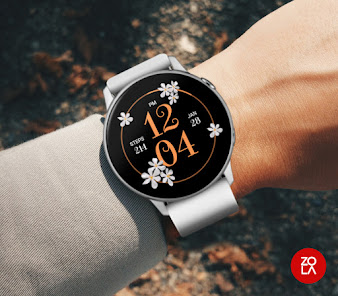
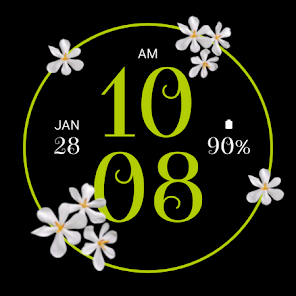
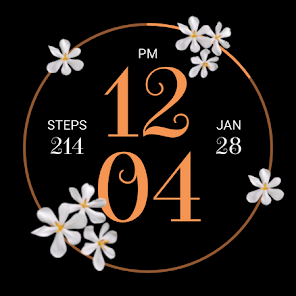
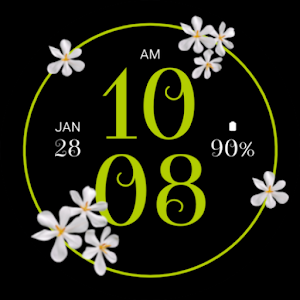
White Flower Watch Face for Wear OS showcases a stunning and elegant design inspired by nature.
$1.49 ABGELAUFEN
Benutzer Rating: 0 Kommentar hinterlassen

This giveaway offer has been expired. White Flower Watch Face is now available on the regular basis.

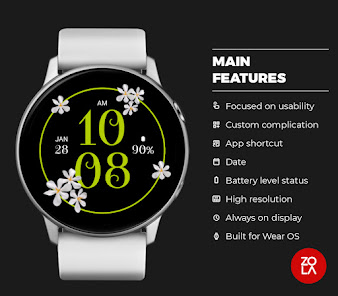
White Flower Watch Face for Wear OS showcases a stunning and elegant design inspired by nature. Embrace the beauty of white floral patterns on your Wear OS smartwatch and elevate your style with this fashionable watch face.

Main Features:
- Digital time display
- Floral design
- 12/24 hours mode based on device settings
- AM/PM marker
- Date
- Multiple color options
- Customizable widget complications
- Customizable app shortcut
- Battery level status
- Always on display
- Compatible with almost all Wear OS smartwatches

Custom Widget Complications:
- SHORT_TEXT complication
- SMALL_IMAGE complication

Installation:
- Make sure the watch device is connected to the phone
- On the Play Store, select your watch device from the install drop-down button. Then tap install.
- After a few minutes the watch face will installed on your watch device
- Alternatively, you can install the watch face directly from on-watch Play Store by searching this watch face name between quotation marks.

Note:
Widget complications shown in the application description are for promotional only. Custom widget complications data depends on your installed applications and watch manufacturer software. The companion app is only to make it easier to find and install the watch face on your Wear OS watch device.

Entwickler:

Redzola Watchfaces

Kategorie:

Personalization

Version:

n

Größe:

Bewertet:

Everyone

Kompatibilität:

Kommentare zum White Flower Watch Face

Thank you for voting!
Please add a comment explaining the reason behind your vote.
Windows Giveaway of the Day
$29.90
free today
PDF-Text OCR Xtractor eignet sich perfekt zum Extrahieren von Text aus PDFs und allen gängigen Bildformaten wie PNG, JPG, BMP und TIFF. PDF Text OCR Xtractor verwendet die Tesseract OCR-Technologie. Tesseract ist vielleicht die leistungsstärkste und fortschrittlichste OCR-Software auf dem Markt, und hier ist der Grund: Zunächst ein bisschen Geschichte. Es wurde 1994 von HP entwickelt, aber bald veröffentlichte das Unternehmen es unter der Apache-Lizenz für die Open-Source-Entwicklung. 2006 übernahm Google das Projekt und sponserte Entwickler für die Arbeit an Tesseract. Heute ist Tesseract die leistungsstärkste OCR-Engine, die Deep Learning verwendet, um Texte aus Bildern (BMP, PNG, JPEG, TIFF usw.) und PDF-Dateien zu extrahieren. PDF Text OCR Xtractor unterstützt mehr als 20 verschiedene Sprachen und ermöglicht es euch, benutzerdefinierte Verarbeitungsparameter für Quelldateien / Bilder festzulegen, z. B. Glätten und DPI-Anpassung, Kontraststeigerung und andere nützliche Tricks, bevor ihr diese analysiert. PDF-Text OCR Xtractor hat eine hohe Genauigkeit und überträgt jedes Bild oder PDF, das ihr habt, in bearbeitbaren durchsuchbaren Text. Die Konvertierung von Bild zu Text erfolgt schnell und problemlos! Haupteigenschaften: 1. Verwendung der besten verfügbaren OCR-Technologie. 2. Unterstützung für mehr als 20 verschiedene Sprachen. 3. Nützliche Bildtransformationen zur Verbesserung der Genauigkeit bei schwierigen Dokumenten. Zusätzliche Funktionen: 1. Günstigste Tesseract Engine grafische Benutzeroberfläche, die ihr finden könnt! 2. Unterstützung für PDF und alle gängigen Bildformate wie PNG, JPG, BMP.